The lab
Part 2. The taste test
The taste test is the core method. You run your saved requests in every option, hide the names, pick the answer you would use, and write one line on why. It is enough to make a real decision, and it sharpens your sense of a good answer far better than one quick try.
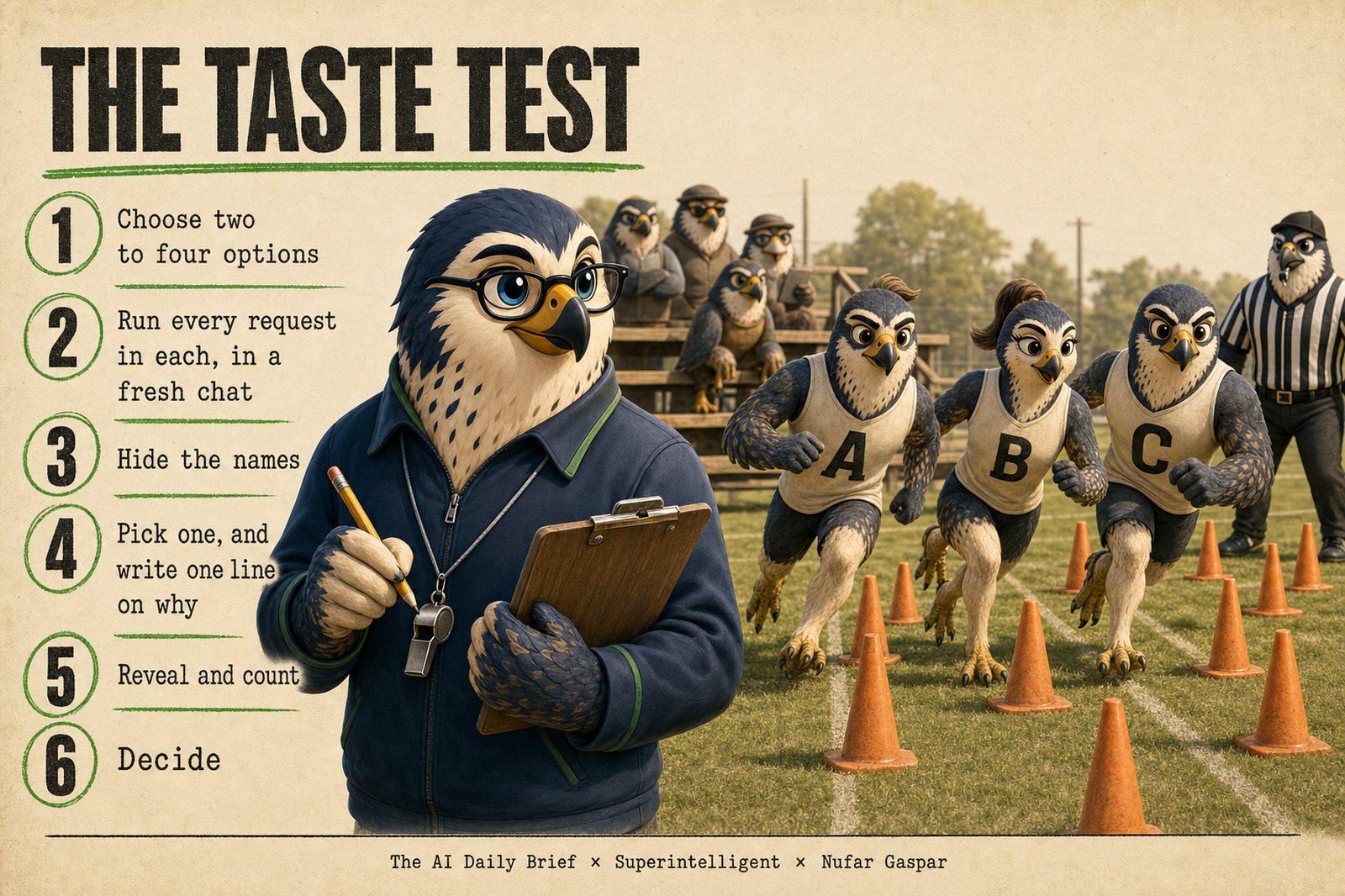
A word before you start: this part is done by hand. You paste, you collect, you hide the names, you pick. For most people that is the right way, and doing it by hand once teaches you what a good answer looks like faster than anything else. If you have more tooling, here is where it helps:
| You have | What changes |
|---|---|
| Chat tools only | Nothing. Parts 1 and 2 are built for you. |
| An AI agent tool such as Claude Code, Codex, or Cursor, but the options you are comparing are chat products | Steps 2 and 4 stay by hand, because no tool can paste into another product's chat for you. Your agent tool can file each answer into the answers folder and run the blind-shuffle script, which takes the fiddly part away. |
| A key that lets a program use AI models (Part 4 shows how to get one), and your options are models it can reach | Part 4 runs every request in every option and hides the names. You score and reveal on a page in your browser. Skip ahead if you want, and come back here for anything that only runs in a chat product. |
Step 1. Choose your options
An option is anything you can compare. It can be a model, such as Claude, ChatGPT, Gemini, or Copilot. It can be a setting inside one product, such as its fast, thinking, or top option. Or it can be an AI agent tool, such as Claude Code, Codex, or Cowork. Agent tools work through several steps on their own, with your files and apps.
Pick two to four options you can open today. Four is the most that stays pleasant by hand. Which ones depends on why you are here:
- Finding your lineup. You are doing this for the first time, or you have no clear favorite. Compare, for example, the fast, thinking, and top options in the product you already use, or the top option from three companies.
- Testing something new. A new model or tool just came out. Compare it, or several new releases at once, with what you use today.
Done: the names of your options are written at the top of a new document.
Step 2. Run every request in every option
For each saved request, open a fresh chat in each option and paste the request exactly as saved. Keep the settings the same everywhere: web search on or off, memory on or off, and the same thinking setting where the product offers one. Copy each full answer into your document with the option's name above it. If you have the folder, save each answer as a file named after the option inside answers/<task name>/. Paste quickly and try not to read yet.
If one option searched the web and another did not, make a note. It is a difference in the test, and it can explain a surprise later.
Done: every request has one full answer from each option in your document.
Step 3. Hide the names
Brand preference is louder than most people expect. Once the names are hidden, all that is left to judge is the answer. Choose whichever of these four ways suits you.
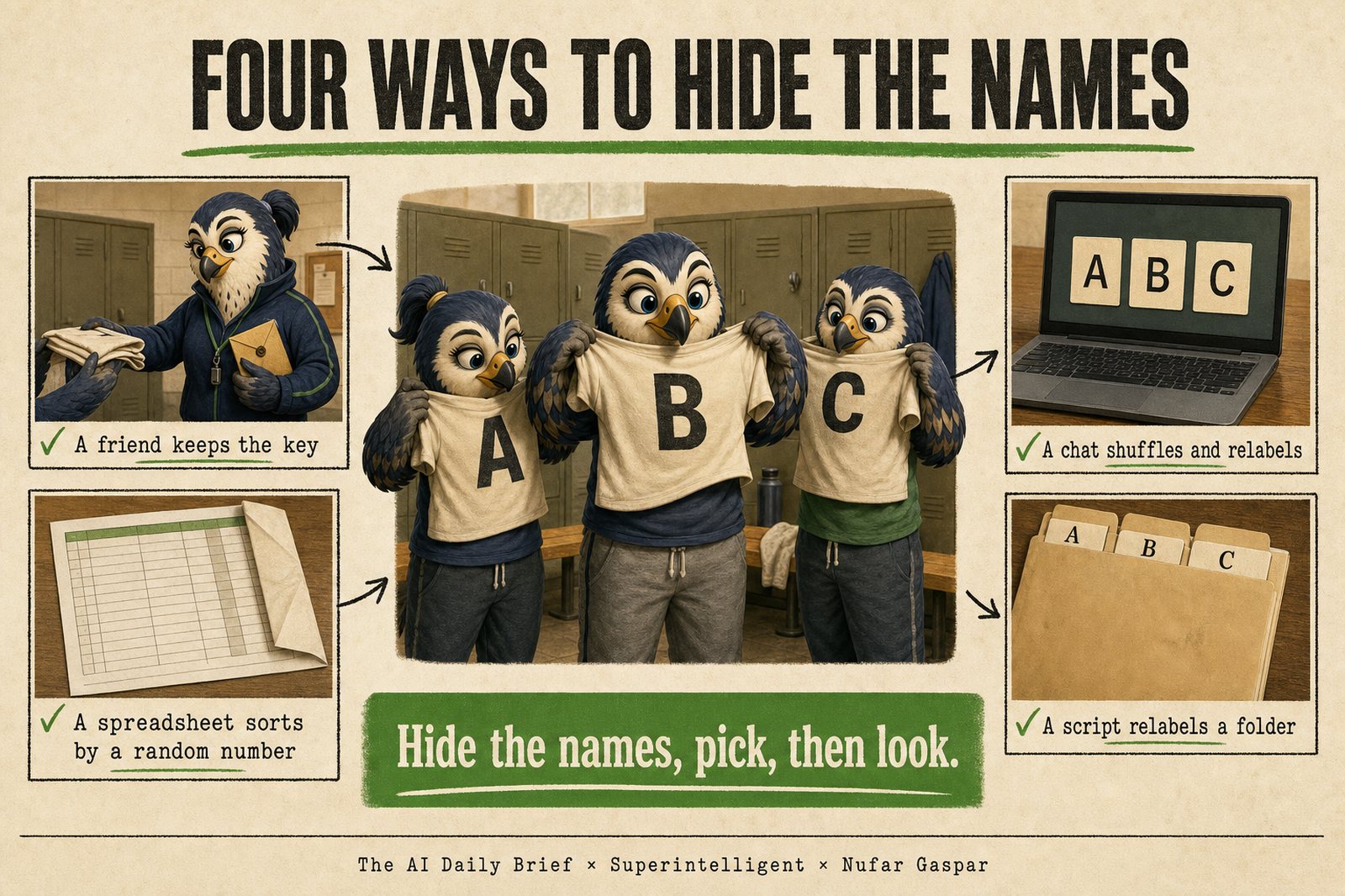
- A friend. Send a colleague the answers with the names on. They send them back in a shuffled order, labeled A, B, C, and keep the key until you have picked. Return the favor.
- A chat. Paste the named answers into a fresh chat in a tool you are not testing, with Prompt 2 below. It removes the names, shuffles, relabels, and keeps the key until you type "reveal". No setup needed.
- A spreadsheet. Use one tab per request and one row per answer. Put the option's name in the first column, the full answer in the second, and the formula
=RAND()in the third. Sort the rows by the third column, then hide the first. The top answer is A, the next is B, and so on. Unhide the first column to reveal. - A script, for people comfortable running a small program. The blind-shuffle script in the materials copies your answers with the names hidden, shuffled separately for each request. It keeps the key in a separate file, records your picks, and counts the wins.
The script, step by step. Make a folder called answers, with one subfolder per request. In each subfolder, save one file per option, named after the option. Agent tools can save their answers straight into it. Put answers next to the blind-shuffle folder from the materials. Open the text window where you type commands in the folder that holds both, and run:
python blind-shuffle/anonymize.py answers
python blind-shuffle/anonymize.py answers --pick 01-weekly-update B "sounded like me"
python blind-shuffle/anonymize.py answers --reveal
The first makes answers-blind, with every answer relabeled A, B, C, D. The second records one pick and your line on why; repeat it per request. The third shows the key, your picks, and the count of wins. Details are in blind-shuffle/README.md.
Prompt 2: Hide the names
Run this in a fresh chat, in a tool that is not one of your options.
I am running a blind taste test of AI tools, and I need you to hide which AI wrote which answer, so I can judge the answers on their own merits. We will go one request at a time. For each request, I will paste several answers, each labeled with the name of the AI model or tool that wrote it. I will paste quickly without reading them.

For each request: remove the names, and remove any line where an answer mentions who wrote it. Shuffle the order, using a fresh shuffle for every request. Relabel the answers A, B, C, and so on. Show me only the relabeled answers, in full, and otherwise exactly as written. Do not comment on them, rank them, or hint at which is which.

Keep the key to yourself. When I tell you my pick for a request, confirm that you have recorded it and ask for the next request. When I type "reveal", show me the full key, my pick for each request with the real names, and a count of wins for each AI.
Images, slides, and websites go in a folder. A chat or a spreadsheet cannot hold them. Save one file per option, or one folder per option for a website, named after the option, and let the script or a friend relabel them. Judge a website from a full-page screenshot, because a live link shows which tool made it in the web address. After the reveal, open the real thing: does it work, does it match what you asked, and how many follow-ups did it take? If a tool leaves a visible mark or a recognizable style, note it next to your pick.
Done: for each request you see answers labeled A, B, C, and you do not know which is which.
Step 4. Pick, and write one line on why
Read every answer before you judge any. It is hard to say how good the first answer is until you have seen the second and the third. Judging is a comparison, and the answers teach you what good looks like for this request. Your scoring guide is a checklist to glance at; the side-by-side read is where the decision happens.
Then ask yourself one question: which of these would I use as it is? Choose one letter. With three or four options, you pick a single winner.
Want more than one winner per request? Score them. Give each answer a score from 1 to 5: 5 means you would use it as it is, 3 means usable after real edits, 1 means it misses the point. Scores show you how close the race was, and they let a second and third place count. The review page in the automated version works this way. One warning from experience: be stingy with top marks. If everything gets a 4 or a 5, the scores stop telling you anything.
Then write one line on why, in concrete words: "sounded like me", "caught the risk I missed", "half the length and nothing lost". Also note whether the win was clear or close.
These one-line reasons are your taste, written down. After a few rounds they start to repeat, and the repeats tell you what you value in an answer.
Done: for every request, one letter, one line on why, and the word "clear" or "close".
Step 5. Reveal and count
Reveal the names: ask your friend for the key, type "reveal" in the chat, unhide the column, or run the script's reveal. Count the wins for each option.
If an option you were rooting for lost, notice the feeling. It is the reason you hid the names.
Done: a count of wins for each option.
Step 6. Decide
The taste test judges one thing: the finished answer. Cost, speed, and how much you enjoy a tool are real reasons to choose, and they come in now, with the names visible. Think in three steps:
- Must-haves. Am I allowed to use it at work? Am I comfortable with its data and privacy terms? Is it on my plan? An option that fails here is out, however good its answers were.
- The answers. Your taste test: who won, and was each win clear or close?
- Tie-breakers. Cost, speed, the features around the model (voice, connections to your other apps, memory, a good mobile app), plan limits, and the effort of changing your habits.
The rule: a clear win on tasks that matter moves you. A close call goes to the tie-breakers.
For example, say a new model comes a close third, and you love the voice mode in its app. Staying in that app is a sound decision. If it had come a clear first on one kind of task, you would send that kind of task to it and keep the rest where they are.
In one line: the benchmark judges the answers, you judge the experience, and the decision uses both.
What you end with depends on why you ran the test:
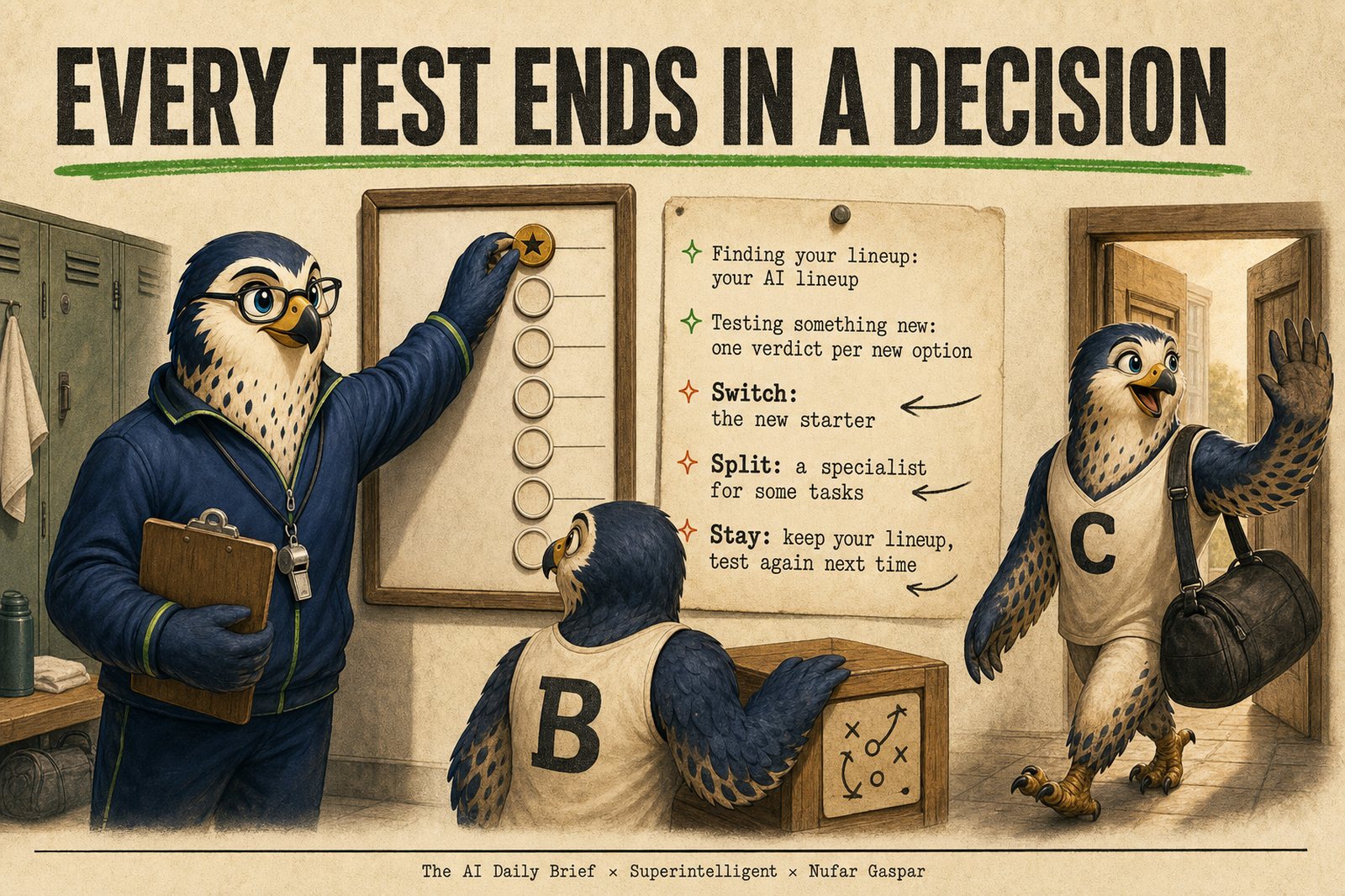
- Finding your lineup ends with your AI lineup: a short card that names your default AI and any kinds of task you send to another one.
- Testing something new ends with one verdict for each new option. Switch: it becomes your new default. Split: it joins your lineup for specific kinds of task. Stay: keep your lineup and test again next time.
Prompt 3 walks you through the decision and writes the result down. Run it in any chat.
Prompt 3: Make my decision
I just ran a blind taste test of AI options. I gave the same saved requests to several of them (AI models, settings inside one product such as fast or thinking, or AI tools), hid which answer came from which, picked the answer I would use for each request, wrote one line on why, and then revealed the names. Help me turn that into a decision. Interview me one question at a time and wait for each answer.

First, ask which situation I am in. Finding my lineup: I compared a few options to choose my default and to see which kinds of task to send elsewhere. Testing something new: I compared a new release with what I use today.

Next, for each request in turn, ask which option won, my one line on why, and whether the win was clear or close.

Then ask about what sits outside the answers. Must-haves: am I allowed to use each option at work, am I comfortable with its data and privacy terms, and is it on my plan? An option that fails a must-have is out, whatever its answers. Tie-breakers: cost, speed, features of the tool I enjoy (such as voice, connections to my other apps, memory, or a mobile app), plan limits, and the effort of changing my habits.

Decide with this rule: a clear win on a task that matters to me should move me, and a close call should be settled by the tie-breakers.

Then give me:

1. My AI lineup: a short card naming my default AI and which kinds of task, if any, go to another option.
2. If I was testing something new, one verdict for each new option, with one sentence of reasoning: Switch (it becomes my new default), Split (it joins my lineup for specific kinds of task; name them), or Stay (keep my lineup as it is and test again at the next release).
3. Three short notes on what I seem to value in an answer, written as qualities that will still make sense after products are renamed, such as "gets to the point in the first line".

Finish with the result that surprised me most, and one thing to retest the next time something new comes out.
Done: your AI lineup, plus a verdict for each new option if you were testing something new, saved under today's date next to your task list.
A finished result: Maya's lineup
Maya compared the top models from three companies, A, B, and C, on her six tasks. Here are her picks after the reveal.
| Task | Winner | Clear or close | Her line on why |
|---|---|---|---|
| 1. Weekly leadership update | Company A | Clear | Sounded like me and needed no edits |
| 2. On-time delivery table | Company A | Close | Same findings; its questions for the leads were sharper |
| 3. Against closing the warehouse | Company B | Clear | Found the lease cost I had missed and said so plainly |
| 4. Difficult conversation | Company A | Close | Kept the ask firm and the tone warm |
| 5. Family weekend | Company C | Close | Planned rest stops for my father |
| 6. Strategy memo to slides | Company C | Clear | Five slides I would present as they are |
All three passed her must-haves. The slides win surprised her, so she reran it, and company C won again. The family weekend was close, so a tie-breaker settled it: she plans trips by voice in company A's app.
Maya's lineup: her default is the top model from company A. Decisions she wants argued against go to company B. Documents into slides go to company C.
Months later, company B releases a new model. It wins the delivery table clearly and loses the rest. Her verdict: "Split. The new model takes my number work. Everything else stays where it is."
Four habits that keep it fair
- Same request, same settings, fresh chat for every option, so the option is the only thing that changes.
- Hide the names before you pick. Look afterwards.
- Notice the cost of getting to an answer you accept. A cheaper model that needs three extra rounds of follow-up ends up costing more.
- Test on day one, and wait a week before trusting what people online say. Launch-week posts mostly repeat the announcement and show off demos. Reports from real work arrive a few days later.
The same AI can answer the same request differently twice. If a result surprises you, run that request again before you act on it, as Maya did.
The core is done. Everything below is extra.