Cohort 6 · starts October 5
Executive Agent Leadership
Go deep on building and leading agents, and design your organization's agentic operating system.
Sign upOptional
Optional. The taste test in the lab gets you the same answer by hand.
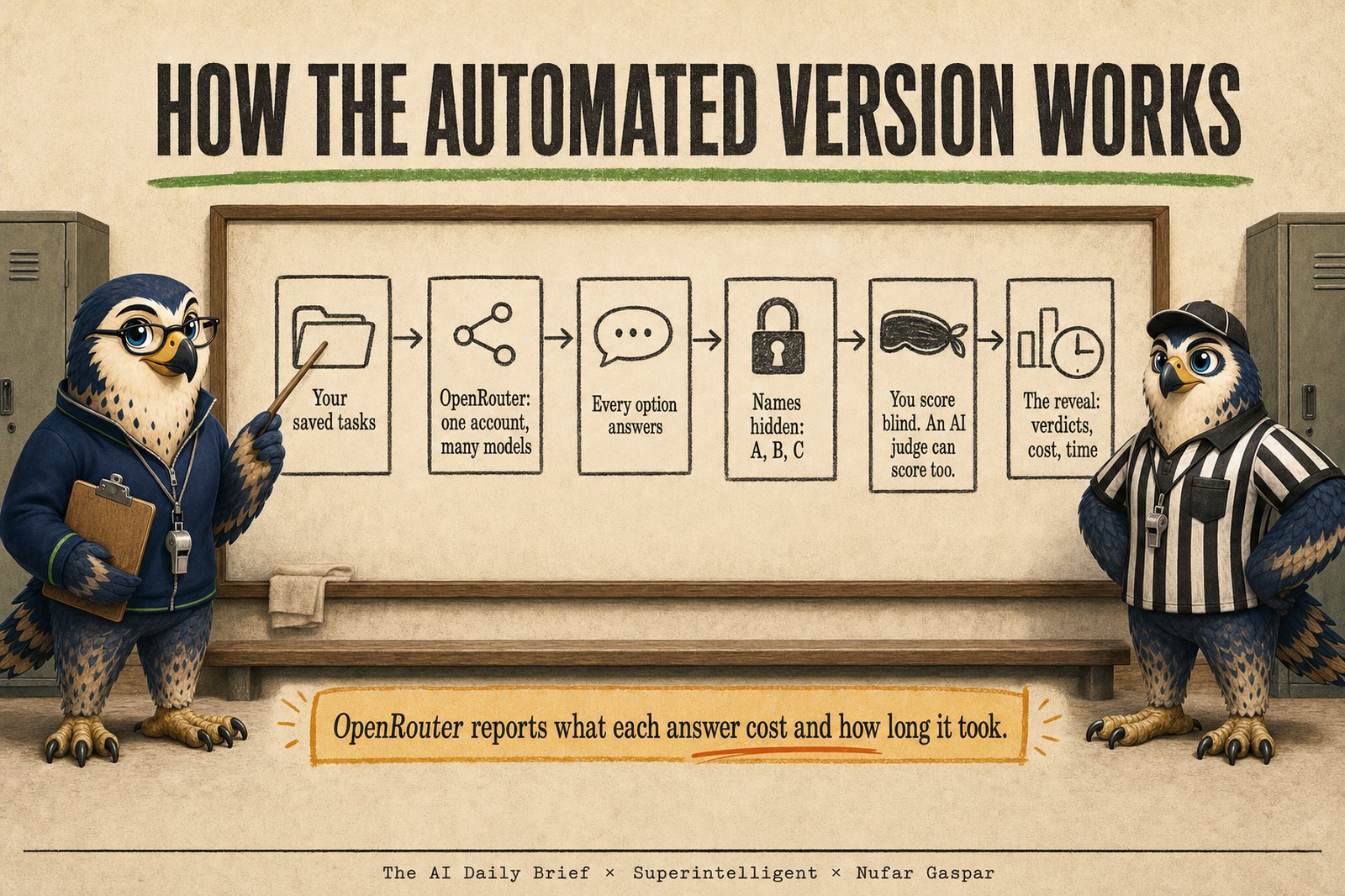
The Benchmark Runner is a small program that runs your personal AI benchmark for you. You give it your saved tasks and the names of two to four AI models. It sends every task to every model, hides which model wrote which answer, and opens a page in your browser where you read the answers and score them blind. Then it reveals the names and tells you what your own scores say: switch, split, or stay, with what each model cost and how long it took. An AI judge can score alongside you if you want a second opinion.
It is for people who are comfortable pasting an API key into a file and double-clicking a launcher. You do not need to write code. If that is not you, the taste test in the lab handout gets you the same answer by hand.
It runs on your own computer. Your tasks and answers go to the AI models you choose, through your own account, and nowhere else. A full run of five short tasks on three models, with the AI judge, usually costs less than a cup of coffee. Long answers, such as a web page, cost more. The reveal page shows what your own run cost.
It does not compare AI tools that only work in their own window, such as Lovable or a chat app's built-in search. Those stay by hand. And it is a personal tool, written for one person's judgment: for a team testing prompts inside a product, platforms such as LangSmith, Braintrust, Langfuse, or promptfoo are the better fit.
Download the Benchmark Runner (zip)
Unzip it anywhere on your computer. The folder holds a one-page START-HERE, a fuller README, two example tasks, and the launchers. The four steps below are the START-HERE file.
Before you start: unzip the folder, and make sure Python is on your computer (version 3.10 or newer, free from python.org/downloads). On Windows, tick "Add python.exe to PATH" on the installer's first screen.
A key is a private code that lets a program use an AI model directly, billed to your own account. Treat it like a password.
key.env.example and name the copy key.env.key.env with a plain text editor (Notepad on Windows, TextEdit on a Mac). Replace paste-your-key-here with your key, and save.Done: a file called key.env with one line in it. The line starts with OPENROUTER_API_KEY= and ends with your key.
Options are the AI models you compare. Open config.json, the runner's settings file, with the same plain text editor.
"options", the three example options are a starting point. Change them to the two to four you want to compare. Each line is a short name of your own, then the model's exact name. Current names are listed at openrouter.ai/models."what_i_use_today", write the short name of the option you use today.tasks folder. For a first try, leave the two example tasks where they are. tasks/README.md shows what a task file looks like.Done: your options are listed in config.json, one of them is named as what you use today, and at least one task file is in the tasks folder.
Double-click 1 Run the tryout (the .bat file on Windows, the .command file on a Mac). A window opens and says what is happening. Each task goes to each option, and each answer is saved under a letter so the names stay hidden.
Done: the window says how many answers came back and names the run.
Double-click 2 Open the blind review. A page opens in your browser with your newest run. Keep the launcher's window open while you review.
Done: the reveal page shows a verdict for each new option (Switch, Split, or Stay) and what each option cost and how long it took.
key.env and sits in this folder, next to the launchers. Its one line has no spaces.config.json and run the tryout again. Nothing was charged."answer_length_limit" in config.json and run the tryout again.http://localhost) into your browser.You can create the OpenRouter key on its Keys page.
Other routes. Another model hub that offers the same kind of single key also works. So does a key directly from the company whose models you want to compare, such as OpenAI, Anthropic, Google, or xAI. A direct key works the same way, with one address changed in the settings file. Cost then shows as "n/a", and only time and length are reported. A direct key reaches one company's models, so comparing across companies in one run takes a hub.
The README in the download has a table with the address and the key line for each company.
Keep it safe. Never paste a key into a chat, an email, or a shared document.
Part 4 of the lab explains the review page, the two Reveal buttons, what the AI judge can and cannot do, and which tasks stay by hand.
Prompt 7 from the lab does that. Open an AI agent tool such as Claude Code, Codex, or Cursor in a folder that holds your benchmark document and the benchmark-runner folder from the download, and paste this.
Help me set up the Benchmark Runner for my personal AI benchmark. In this folder you will find my benchmark document (my saved tasks, each with its exact request, its material, and its scoring guide, plus my decision rule), the made-up material the tasks use, and a benchmark-runner folder. The Benchmark Runner is a small program that sends each task to every AI option and saves the answers under random letters. It opens a review page in my browser where I score the answers with the names hidden. Then it reveals the names, with a verdict from my own scores and what each option cost and how long it took. An AI judge can score alongside me as a second opinion.

Before changing anything, read my benchmark document and the START-HERE and README files in the benchmark-runner folder. Where those files are more specific than this message, follow them.

Then interview me, one question at a time, and wait for each answer:

- Which options do I want to compare, and how is each one named on the service I am using? Keep it to two to four, because I will read every answer myself. If I name more, ask me which ones to drop.
- Is one of them what I use today? If so, I will get Switch, Split, or Stay for each other option. If not, I will get a lineup: my default, and which tasks go elsewhere.
- Do I want an AI judge as a second opinion? If so, it must come from a company that made none of the options. Refuse any judge that matches an option.
- Is my key already set up the way START-HERE describes? Remind me never to paste the key into this chat.
- Does any task need material you cannot find in this folder?

Then do the work. Convert each task into the format the runner expects, one file per task, keeping my request and scoring guide word for word. If a task needs web search or a build tool, tell me it stays by hand and leave it out. If a task asks for a web page, set it up to be answered as one file, so the review page can show it as a real page. Fill in the settings from my answers. Run one everyday task first and show me the lettered answers before running anything else, so I can check that the setup is fair. Once I approve, run everything. Then open the review page for me and explain how to use it: read every answer to a task before scoring any, score each answer from 1 to 5, and be stingy with top marks. My scores save on every click. I press a Reveal button myself when I am done.

After the reveal, save a copy of the reveal page and my decision next to my benchmark document. Then tell me in plain words: the total cost, the slowest task, the tasks where the judge and I disagreed, and any task where the answers differed so much in length that I should check the settings. Tell me how to rerun everything the next time something new comes out.
Some products already run a side-by-side comparison with a scoring guide and an AI judge. LangSmith, Braintrust, and Langfuse each let you run your saved requests across several models, score the answers with an AI judge, and review them by hand. promptfoo does the same as a free, open-source tool for people comfortable with a command line. They are built for teams testing prompts inside software they ship. For one person comparing a few options on real tasks, they are more than you need, and none of them hides the names on options you choose. That is why the taste test and the small script exist. If your company already uses one, it will run the scored version for you.
Keep going with us
Cohort 6 · starts October 5
Go deep on building and leading agents, and design your organization's agentic operating system.
Sign upCohort 4 · starts October 12
Need to catch up first? Get fluent in using AI and building with AI, for yourself.
Sign up