Cohort 6 · starts October 5
Executive Agent Leadership
Go deep on building and leading agents, and design your organization's agentic operating system.
Sign upSession notes
Nufar Gaspar · Frontier Lab with The AI Daily Brief and Superintelligent · October 1, 2026
The session as a readable reference, in the order it was taught, for people who attended and people who only have the recording. Every prompt mentioned here is printed in full in the lab handout.
Every new AI release arrives the same way: an announcement, a table of test scores, a launch post, and a week of hot takes. The question they leave open is yours: is it better at my work?
The public tests the whole industry shares are close to their ceilings. When every model scores near the top, the table stops telling them apart, so companies publish more tests of their own. A company's own test can be perfectly fair and still be a task it chose, scored against a bar it set. So ask of every number: is this a shared test, or one the company created? And the things launch posts now stress most, cost and feel, are the hardest to read off a table.
First impressions have a timing problem. On launch day, most posts repeat the announcement, and the examples are demos: a game, a poem, a website made in one go. Reports from real work, such as "it quietly dropped a condition in my contract review", arrive a few days to a week later. So the rule has two halves: test right away, and read reactions later. In the live demo, one new option was two days old. Too early to trust what the internet says about it. Never too early for your own benchmark.
Two objections came up. "They're all good enough now." Often, yes. But a daily task turns a small gap into a large one. Your wish list holds the tasks you gave up on, and a release is when they might start working. And AI agent tools, which work through several steps on their own with your files and apps, differ far more than any table shows. "My company picks the model." That often works well. You still choose between the fast, thinking, and top options inside one product, and when the platform changes its model, your saved requests show whether your work got better.
The line to remember: published scores describe the average user, and your benchmark describes you.
Six ideas carry everything else.
The things you compare are options. An option can be a model, such as Claude, ChatGPT, Gemini, or Copilot. It can be a setting inside one product, such as its fast, thinking, or top option. Or it can be an AI agent tool, such as Claude Code, Codex, or Cowork, which works through several steps on its own. You compare two to four at a time.
There are two reasons to run it. Finding your lineup is for when you have no clear favorite yet. You end with your AI lineup, a short card naming your default AI and any kinds of task you send to another one. Testing something new is for when a new model or tool comes out. You compare it with what you use today and give it one of three verdicts. Switch: it becomes your new default. Split: it joins your lineup for specific kinds of task. Stay: keep your lineup and test again next time.
And there are three depths. The taste test is for everyone and complete on its own. The scored version and the automated version are optional, for the extra diligent and for builders.
Your benchmark can only tell you about the work it contains. If every task is an email, you learn which AI writes the best email, and that is all you learn. So choosing the tasks decides whether the whole benchmark is worth anything.
The Work Mix is a map of your work in six questions. A good set of five or six tasks touches most of them.
| Question | Cover both ends | For example |
|---|---|---|
| What kind of work? | Writing, analysis, research, decisions and advice, planning and admin, making things | A board update, a sales report, a competitor brief, a trip plan, a slide |
| How often? | Daily habits, and rare moments that matter | The weekly team email, and the annual budget memo |
| What's at stake? | Quick asks, and ones where a weak answer costs you | A lunch poll, and a note to a client about to leave |
| Where does the AI start? | A blank page, or your own material | "Draft a welcome note", and "turn these notes into decisions" |
| Which part of life? | Work and personal | A hiring plan, and a child's birthday party |
| What's on your wish list? | Something AI has never done well for you | "Turn my strategy memo into slides I would present as they are" |
Four habits make a set stronger. Pick work you know well enough to spot a weak answer quickly, because you will be the judge. A task where every answer looks fine to you cannot separate the options. Include one matter-of-taste task, where the best answer is simply the one you prefer, such as a message in your own voice. Include one task you can check, such as figures pulled from a table. And weight the set toward what fills your week.
Maya's set. Maya is chief operating officer of a logistics company. Her set starts with the weekly leadership update, in her voice, and three findings from a table of on-time deliveries by region. It adds the case against closing the smallest warehouse, and a plan for a hard conversation with a manager who missed targets twice. It ends with a family weekend for two teenagers and a grandparent who walks slowly, and a strategy memo turned into five slides. That covers writing, analysis, a rare high-stakes decision, advice, personal planning, and her wish. Her first attempt was five emails and summaries, all daily and low stakes. Every good AI handles those well, so the test would have ended in a tie. Three swaps fixed it, each filling an empty row of the Work Mix.
Let the AI interview you. Paste Prompt 1: Find my tasks into the AI tool that knows you best. If it has memory of you, it starts by summarizing what it thinks you use AI for. Then it asks one question at a time and tells you which parts of the map are still empty. It always asks what you have wanted AI to do and it couldn't. It proposes three to five everyday tasks, things you really do, plus one or two wish-list tasks. Each comes as a complete request with realistic made-up material written in, so nothing private is ever pasted. For each task it also asks how you would tell a great answer from a weak one. Your reply becomes a short scoring guide, written before you see a single answer.
Done: four to six requests ready to paste, plus a short table of what they cover, saved in one document.
The line to remember: if every task is an email, you learn which AI writes the best email.
This part is done by hand, and for most people that is right: doing it once by hand teaches you what a good answer looks like. If you have an AI agent tool, it can file the answers and run the blind-shuffle script for you. If you also have a key that lets a program use AI models, the automated version in the optional part can do more. When your options are models that key can reach, it runs the requests and hides the names for you. You still read and score the answers yourself, on a page in your browser. Pasting into another product's chat always stays by hand.
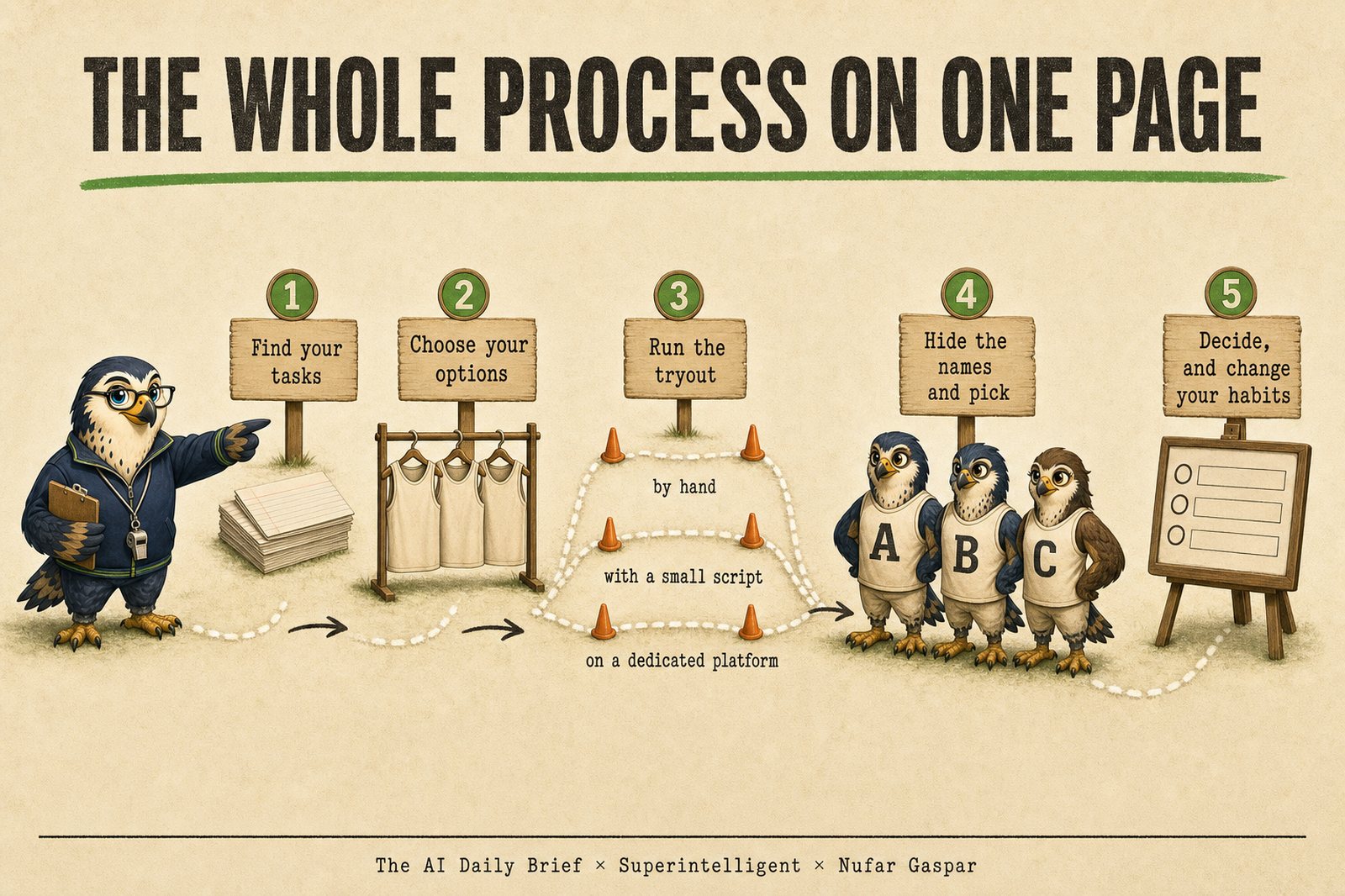
Step 1. Choose your options. Two to four you can open today. When finding your lineup, try the fast, thinking, and top options in your usual product, or the top option from three companies. When testing something new, take the new release plus what you use today. Done: the names at the top of a new document.
Step 2. Run every request in every option. Open a fresh chat for each and paste the request exactly as saved. Keep web search, memory, and the thinking setting the same everywhere. Copy each full answer under the option's name, and try not to read yet. Done: one full answer from each option for every request.
Step 3. Hide the names, using one of the four ways in Part 5. Done: answers labeled A, B, C, and you do not know which is which.
Step 4. Pick, and write one line on why. Read every answer before you judge any, because judging is a comparison. Then ask one question: which of these would I use as it is? Choose one letter, and write the reason in concrete words: "sounded like me", "caught the risk I missed". Note whether the win was clear or close. After a few rounds the reasons repeat, and the repeats are your taste, written down. For a finer read, score each answer from 1 to 5, and be stingy with top marks. If everything gets a 4 or a 5, the scores stop telling you anything. Done: one letter, one line, and "clear" or "close" for every request.
Step 5. Reveal and count. If an option you were rooting for lost, notice the feeling. It is the reason you hid the names. Done: a count of wins for each option.
Step 6. Decide, with Prompt 3: Make my decision (Part 7). Done: your lineup or verdicts, saved under today's date.
The steps build in the four habits that keep it fair:
Hiding the names is the step people skip, so there are four ways to do it.
blind-shuffle/anonymize.py), is a small program that relabels a folder of saved answers, shuffled for each request, and tallies your picks.Images, slides, and websites go in a folder, one file or folder per option, and the script or a friend relabels them. Judge a website from a full-page screenshot, since a live link shows its maker in the address. After the reveal, check what needs no hiding: does it work, and how many follow-ups did it take?
The line to remember: hide the names, pick, then look.
Pick by taste is the taste test: read the hidden answers, choose the one you would use. It is fast, and it sharpens your judgment every round.
Score against a guide is the scored version. A scoring guide is a few written lines per task: what a great answer includes, what earns top marks, and what is an automatic fail. "Sounds like me" is a wish. A scoring guide makes it checkable: "no sentence over 25 words, opens with a concrete example, no hedging phrases." It takes longer. In return, results compare from one release to the next.
A footnote on checking an AI judge. If an AI does your scoring, check it now and then. Score a few hidden answers yourself and compare. Where you mostly agree on a kind of task, trust it with that kind. Where you don't, fix the guide, change the judge, or keep scoring yourself. The benchmark checks your judge, too.
The result comes first: your AI lineup, or Switch, Split, or Stay for each new option. Then three steps, in order.
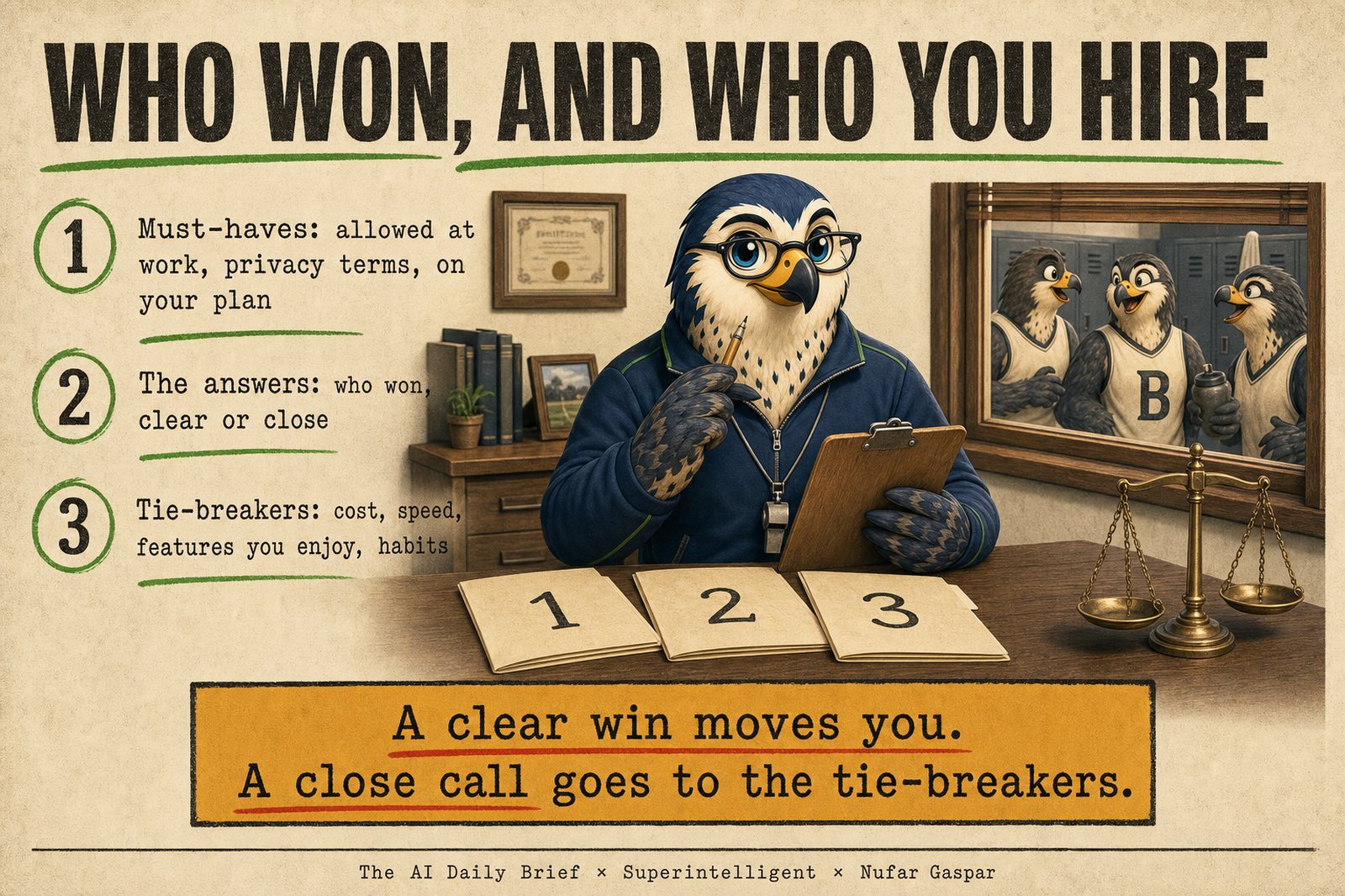
The rule: a clear win on tasks that matter moves you. A close call goes to the tie-breakers. Say a new model comes a close third and you love its voice mode. Staying in that app is a sound decision. Had it come a clear first on one kind of task, you would Split: send it that kind, and keep the rest where it is.
The line to remember: the benchmark judges the answers, you judge the experience, and the decision uses both.
The scored version (optional) keeps your tasks and adds a scoring guide for each, plus your own scores from 1 to 5. It also adds an AI judge: a second AI, from a company that made none of your options, scoring the same hidden answers. An AI judge left to itself gives top marks to almost everything. So Prompt 6 asks it to act as a tough editor: rank the answers first, give at most one top mark, and treat competent work as a 3. You score first, and your own scores decide. When you and the judge disagree, your guide is missing something, the judge misread, or polish swayed you. Everyday tasks stay word for word between runs, and you write your decision rule before seeing any answers. Prompts 4 to 6 cover it.
The automated version (optional) is for people comfortable pasting an API key, a private code that lets a program use an AI model directly, into a file. The Benchmark Runner is a small program that runs your personal AI benchmark for you. It sends every task to two to four options, hides the names, and opens a page in your browser where you read the answers and score them blind. Then it reveals the names with a verdict from your own scores. Only then does it show what each option cost and how long it took, as tie-breakers. The AI judge can score alongside you as a second opinion. It reads only the code of a web page and cannot see the page itself. Your own scores decide. Tasks that need web search or a build tool stay by hand. The materials site shows how to get a key and run it in four steps, and Prompt 7 has an agent tool set it up with you.
Platforms that do this for teams. Some products already run a side-by-side comparison with a scoring guide and an AI judge. LangSmith, Braintrust, and Langfuse each let you run your saved requests across several models, score the answers with an AI judge, and review them by hand. promptfoo does the same as a free, open-source tool for people comfortable with a command line. They are built for teams testing prompts inside software they ship. For one person comparing a few options on real tasks, they are more than you need, and none of them hides the names on options you choose. That is why the taste test and the small script exist. If your company already uses one, it will run the scored version for you.
That is the point of building it once. The thinking about how to evaluate is done and saved, so a new release only means running the taste test again. Refresh the benchmark itself only when your work changes, when a new kind of AI ability arrives, or when a task stops separating the options. Built well, it serves you for a good few months.
Everything lives on the materials site, in these sections:
At DevDay on September 29, OpenAI released GPT-6.1 Sol, and GitHub's announcement said it finishes tasks with less usage and fewer steps. An early measurement from Artificial Analysis reportedly pointed the other way, which your own cost per task settles. And xAI called Grok 4.7 "a notable improvement", while Artificial Analysis measured a modest gain on its shared index: a company's claim and a shared test, telling different stories.
Keep going with us
Cohort 6 · starts October 5
Go deep on building and leading agents, and design your organization's agentic operating system.
Sign upCohort 4 · starts October 12
Need to catch up first? Get fluent in using AI and building with AI, for yourself.
Sign up